
This is an old revision of the document!
Table of Contents
Hi folks. You are here maybe because you are very close to the goal… but you experience problem. Do not give up ! Here are some help to debug your configuration.
Debugging Arduino
You uploaded your first configuration file in your Arduino controler ? Wants to test your wirings and your soldering ?
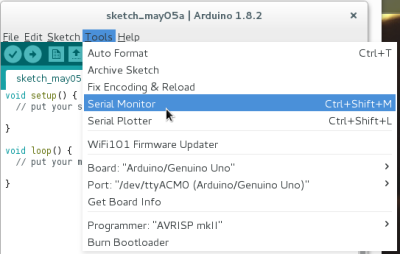
Open the Arduino software. Click on “Tools” > “Serial Monitor” like the following picture :
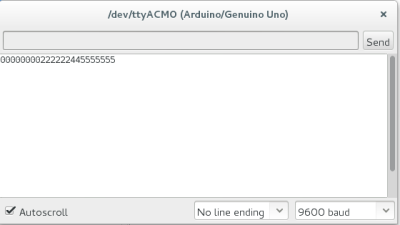
Hit a segment of your board, or create a contact with two pins of your Arduino (use a paper clip on your arduino, for example). Something should appear on the screen like the following picture :
Debugging your pydarts software
Delete pyDarts config file and then launch from a terminal (“cmd” in MS windows) :
pydarts --debuglevel=1
When the “board calibration” screen appear, hit a segment, and see what is the output on the terminal.
Note that there is a file named KNOWN_ISSUES in the pydarts package that summarize all the problems already encountered by any of us.
My issue is still there !
Please post a message on the sourceforge discussion channel. Please give minimal information to help the community debugging :
- your pyDarts version (displayed when you launch the soft, or when when you downloaded it)
- the output of pydarts with option “–debuglevel=1”
- your configuration (Arduino type, Raspberry if relevant, etc)
- a good description of your issue
Enjoy !